Guide
How to add an interactive map to WordPress (without a plugin)
Step-by-step guide to embedding a custom interactive map on your WordPress site with the block editor, Classic editor, Elementor or Divi. No plugin needed.
Updated 4 min read
Want to show your attractions, trails, venues or store locations on your WordPress site? You don't need a map plugin. With an embeddable map you build the map once, paste a single code snippet into WordPress, and every future update appears on your site automatically.
This guide shows you how, step by step.
What you need
- A WordPress site where you can edit pages. On WordPress.com, your plan needs to allow custom HTML.
- An embeddable map. In this guide we use Zoneatlas maps, which you can try for free.
Step 1: Create your map
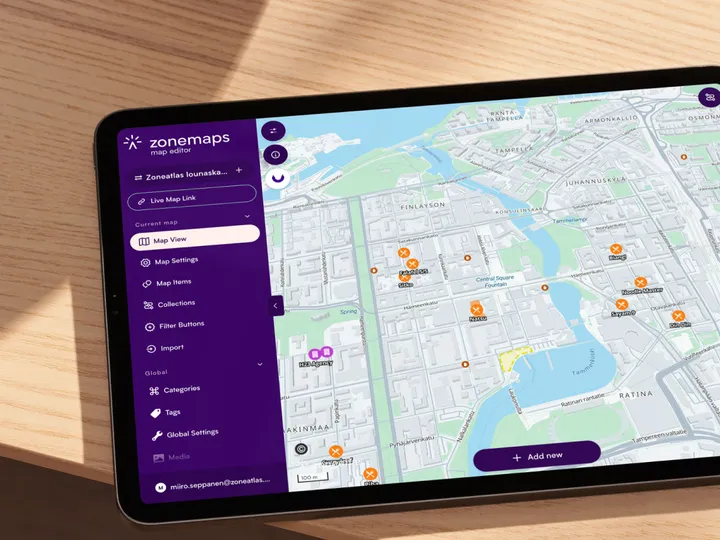
Sign up free and create a new map in Zoneatlas Manager. It runs in your browser, so there is nothing to install.
- Add your places. Add points of interest, draw routes and areas, or import your existing locations from a spreadsheet.
- Match your brand. Set your own colours, fonts, logo and icons so the map looks like part of your website.
- Publish. Your map gets its own live link that you can open in any browser.
Step 2: Copy the embed code
Open your map's sharing settings and copy the embed code. It's a standard iframe that looks like this:
<iframe
  title="YOUR-MAP-NAME"
  src="https://YOUR-MAP-URL/?cooperativeGesturesEnabled=true"
  width="100"
  height="600"
  scrolling="no"
  frameborder="0"
  allow="fullscreen; geolocation"
  id="zoneatlas-map-iframe"
  style="width: 100%; background: transparent;">
</iframe>
The title field can be changed to a short description of your map. Screen readers use it, and it helps visitors understand what the map shows.
Step 3: Paste the code into WordPress
Where you paste the code depends on how you edit your pages.
Block editor
- Open the page or post where you want the map.
- Click the + (Add block) button and search for Custom HTML.
- Paste your embed code into the block.
- Click Preview to see the map, then Update or Publish.
Classic editor
Switch from the Visual tab to the Text tab, paste the code where you want the map to appear, and update the page.
Elementor, Divi and other page builders
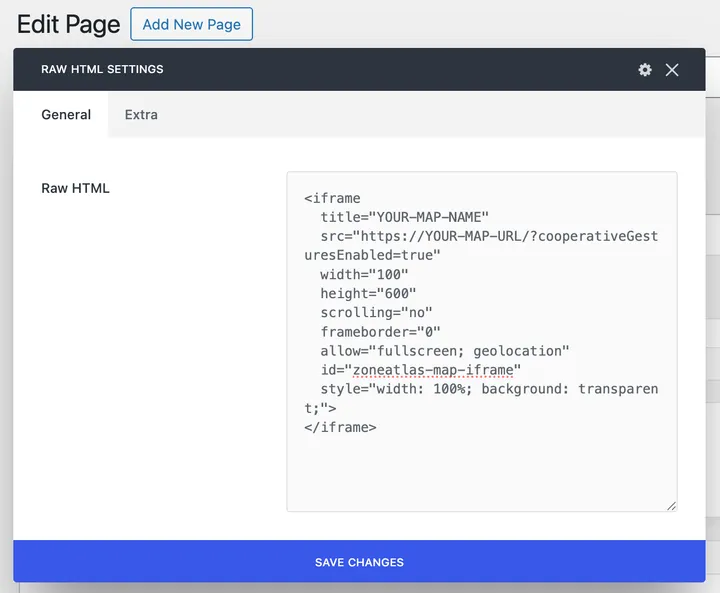
Drag an HTML widget (Elementor) or a Code module (Divi) onto your page and paste the embed code into it. Most other page builders have a similar HTML or code element, often called Raw HTML.
Step 4: Check it on mobile
Open the page on your phone. The map fills the full width of your content area, but a fixed height can feel tall on small screens. If it does, swap the height in the style attribute for one that scales with the screen:
style="width: 100%; height: 70vh; min-height: 400px; border: 0;"Troubleshooting and FAQ
Why does the map disappear after I save the page?
WordPress removes iframes for users who aren't allowed to post unfiltered HTML. On a normal site, Administrators and Editors can. On a multisite network, only Super Admins can. On WordPress.com, it depends on your plan. Ask your site administrator to add the map, or check your plan.
Why is the map cut off or too small?
Increase the height value in the embed code. Keep the width at 100% so the map fits any screen.
Do I need to update WordPress when the map changes?
No. The map's content lives in Zoneatlas, so any change you publish there shows up on your site straight away. You don't need to edit the page or clear your cache.
Why not just embed Google Maps?
A Google Maps embed is free and familiar, but it looks the same on every website and shows businesses that have nothing to do with you. A Zoneatlas map follows your brand, shows only your own places, routes and areas, and keeps your data in the EU.
Map plugin or embed: which is better?
WordPress map plugins store your map inside WordPress. That works, but it means another plugin to update, possible conflicts with your theme or other plugins, and a map you can only use on that one site.
An embedded map keeps everything in one place outside WordPress. There's nothing to maintain, your whole team can edit the map without touching the website, and the same map can be shared as a live link or used on other sites.
See how Zoneatlas works with WordPress